OpenMemory: The Long-Term Memory Your AI Agents Actually Deserve
OpenMemory is a free, local, open-source cognitive memory engine that turns your AI agents from goldfish into assistants with real memory. Here's how I use it with MCP and OpenCode.
Hey everyone! Hope you’re having a great week. If you’ve been following my recent posts on AI agents, you know I love finding tools that actually change how I work day-to-day. Today’s one of those. I’ve been using OpenMemory as the long-term memory layer for my agent workflows, specifically through OpenCode and MCP, and I want to walk you through why it’s worth your attention.
The problem it solves is simple: LLMs forget everything between conversations. Every time you start a new chat, it’s like meeting someone with total amnesia. And most so-called “memory solutions” aren’t really memory, they’re just RAG (Retrieval-Augmented Generation) with a fancy name.
OpenMemory is different.
What is OpenMemory?
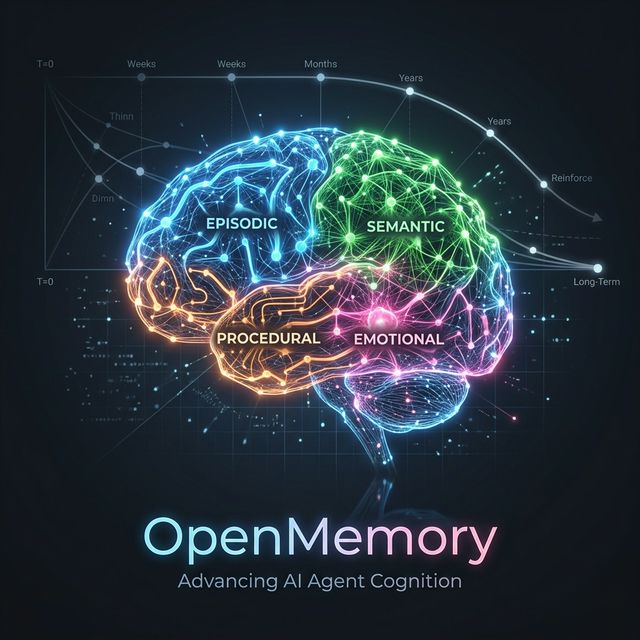
Instead of another vector database with fancy marketing, OpenMemory is an actual memory system inspired by how we organize knowledge. It doesn’t just treat everything as a flat string of text. It actually categorizes what it hears: it separates episodic events (like “the user mentioned they prefer dark mode”) from semantic facts (“Python is a programming language”) and procedural skills like deployment steps. It even tracks emotional tone and its own “reflective” insights about a conversation.
The best part? It’s completely self-hosted and local-first. It runs on SQLite right on your machine, so you aren’t tethered to a cloud provider or paying for every single memory recall.
Why RAG Isn’t Enough
Most RAG pipelines just chunk text, embed it, and pull back whatever is mathematically similar. It’s basically a glorified search engine. But similarity isn’t memory. A basic vector store doesn’t understand if something is a hard fact or just a fleeting preference. It doesn’t know what’s important, how memories relate to each other, or, most crucially, when something was true.
OpenMemory solves the time problem with a Temporal Knowledge Graph. Every memory has a timestamp, so your agent can actually reason about what was true three weeks ago versus what changed yesterday. It’s context with a timeline, it’s not just a pile of documents.
Up and Running in 10 Seconds
Getting started with OpenMemory is surprisingly straightforward.
Python:
pip install openmemory-pyfrom openmemory.client import Memory
mem = Memory()
# Store a memory
await mem.add("user is allergic to peanuts", user_id="u1")
# Search relevant memories
results = await mem.search("allergies", user_id="u1")Node / JavaScript:
npm install openmemory-jsimport { Memory } from "openmemory-js"
const mem = new Memory()
await mem.add("user prefers short answers", { user_id: "u1" })
const results = await mem.search("preferences", { user_id: "u1" })No cloud config, no third-party API keys, no waiting 3 seconds for a remote service to warm up. Just code.
The Workflow I Actually Use: MCP + OpenCode
This is the part I want to focus on, because it’s what I actually use day-to-day.
OpenCode is a terminal-based AI coding assistant that speaks MCP natively. OpenMemory ships its own MCP server, so you can connect the two with a few lines of config and suddenly your coding sessions have persistent memory across projects, across restarts, across everything.
Step 1: Start the OpenMemory server
If you’re using the self-hosted backend (recommended for multi-session use):
# One-click deploy or run locally
docker run -p 8080:8080 caviraoss/openmemory-server
Or spin it up with the one-click deploy linked in the GitHub repo.
Step 2: Wire it into OpenCode via MCP
In your OpenCode config (or any MCP-compatible client), add the OpenMemory server:
{
  "mcpServers": {
    "openmemory": {
      "type": "remote",
      "url": "http://localhost:8080/mcp",
      "oauth": false,
      "headers": {
        "x-api-key": "your-secret-api-key-here"
      },
      "enabled": true
    }
  }
}
That’s really it. From this point on, OpenCode can call these MCP tools automatically to store context, query relevant memories, or even “reinforce” a specific fact so it stays in the agent’s short-term recall longer.
The Memory-First Workflow
I codified my workflow in AGENTS.md so every AI agent that touches this repository follows the same pattern. It’s a simple loop: retrieve first, apply, and persist. Before any non-trivial task, the agent queries OpenMemory for context like past architecture decisions or user preferences. Then it applies that context to the current task so I don’t have to explain things for the tenth time. Finally, it persists a concise summary of what just happened so the next session can pick up the thread.
It’s important to keep these memories structured. I prefer factual ones for stable truths (“this project uses pnpm”) and contextual ones for the richer “why” behind a decision. And obviously, we sanitize everything. No secrets, tokens, or personal stuff ever enters the memory layer. This loop genuinely builds context over time, turning a coding agent from a one-shot help bot into a teammate with a memory.
What This Looks Like in Practice
If I tell OpenCode that a project uses pnpm and deploys to Vercel, it doesn’t just forget that once the terminal closes. Next week, when I’m working on a deploy command, OpenCode queries OpenMemory first and already has the context. No re-explaining my setup.
I use this to store everything from project conventions and constraints to architecture “whys” and even the root causes of old bugs. I’ve even made it a rule: if OpenMemory is down, the agent keeps working but notes the missing context. It makes for a massively better pair-programming experience when the AI actually pays attention to how you work.
Also Great With Claude and Other MCP Clients
The same .mcp.json config works for Claude Desktop, Cursor, and Windsurf. For Claude specifically:
claude mcp add --transport http openmemory http://localhost:8080/mcpBut honestly, the combo with OpenCode is where it shines for me: it’s terminal-native, fast, and the memory layer makes it feel like a real pair programmer that actually pays attention.
Other Integrations Worth Knowing
If you’re not using OpenCode/MCP, OpenMemory also has first-class support for LangChain, CrewAI, AutoGen, and a direct OpenAI client wrapper. You can drop it into any of those as a shared long-term store with minimal setup. Check the GitHub README for concrete examples.
Pulling Data From Your Sources
Another feature I found really useful is the Connectors. You can ingest data from external sources directly into the agent’s memory:
github = mem.source("github")
await github.connect(token="ghp_...")
await github.ingest_all(repo="owner/repo")
Supported connectors include: GitHub, Notion, Google Drive, Google Sheets, Google Slides, OneDrive, and a generic web crawler. Perfect for giving an agent deep context about a codebase or knowledge base without having to write it out manually.
Backing Up and Porting Your Memories
I was surprised by how portable this setup is. Since it’s all just SQLite files on a Docker volume, you can back up a session with a simple tar command.
To create a backup, I just run a quick Docker command that grabs the volume in read-only mode and writes a compressed snapshot into my docs/open-memories folder. Restoring on a new machine is just the inverse: you spin up the container, stop it, dump the backup into the volume, and start it back up.
I keep my latest memory snapshot committed to the repo. When I clone the project on a new laptop, I can restore that brain and pick up right where I left off on my desktop. There are just a few rules I follow to keep it clean: always restore the full set instead of cherry-picking, and always create a safety backup before overwriting an existing memory bank.
Memory Hygiene: What Not to Store
It’s tempting to store everything, but you have to be intentional. I follow a simple rule: store architecture decisions, user preferences, and bug root causes, but never store API keys, tokens, passwords, or anything that turns your memory pool into a security risk. I explicitly enforce this in my AGENTS.md so the agents themselves know to ignore the sensitive stuff. Memory should simplify your work, not become a liability.
The Numbers
If you’re wondering whether it’s worth it over a SaaS alternative, here’s how the benchmarks look. It’s roughly 2-3x faster and significantly cheaper because you aren’t paying the “SaaS tax” on every single token your agent remembers.
| Metric | OpenMemory | Typical SaaS |
|---|---|---|
| Query latency | 110ms | ~350ms |
| Cost / 1M tokens | $0.35 | $2.50+ |
| Monthly cost | ~$6 | $90+ |
| Throughput | 40 ops/s | 10 ops/s |
Your data never leaves your own infrastructure, and you aren’t waiting 3 seconds for a remote service to wake up. For a fast-moving coding assistant, that latency difference is the difference between a smooth flow and a frustrating lag.
My Thoughts
The reason I’m sticking with OpenMemory isn’t just because it’s fast or cheap. It’s because it actually models memory the right way. It isn’t just dumping embeddings into a bucket; it understands time, importance, and the type of knowledge it’s holding.
The decay engine is the most interesting part for me. It simulates how we actually forget: episodic events fade faster, while semantic facts stick around. It makes the agent feel less like a database and more like a partner that knows what’s still relevant and what isn’t.
Setting this up with MCP and OpenCode has been one of the biggest upgrades to my daily setup. It’s hard to go back to a “goldfish” AI once you’ve had one that actually builds a mental model of your codebase over weeks of work.
It’s still early days (v2 is a full rewrite), but even in its current state, it’s remarkably useful. You can check it out on GitHub or hit their landing page.
If you’re already using something for long-term memory, or if you’ve been sticking to manual context-passing, I’d love to hear how you’re handling it.
Happy coding!